Providers and model discovery
Choose a provider in Settings → Models & Usage → Custom Models → Add model. The preset fills the endpoint and API format; enter your provider’s API key and an exact model ID. The optional gateway has its own provider credentials and model routes.
Browse OpenRouter models
- Select OpenRouter and enter your OpenRouter API key.
- Click Fetch provider models to load its current catalog.
- Use Search provider models to filter by model name or ID.
- Check individual models, or use Select filtered to select the visible results. Click Add selected to save them.
Selections remain selected when you change the search. Use Clear selection before selecting a different group if you only want that group.
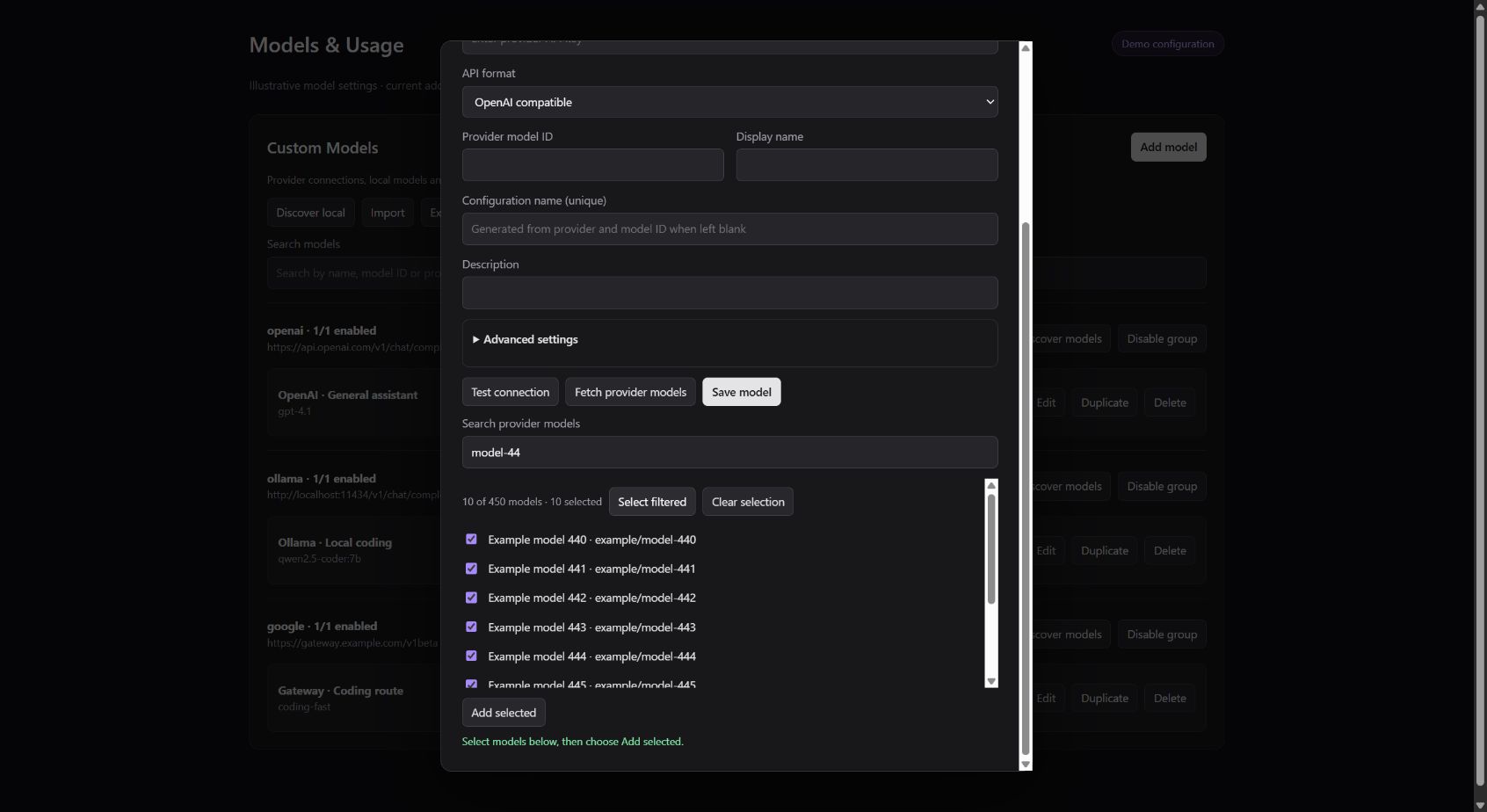
Current addon UI in an isolated browser demo with 450 illustrative model entries.
The catalog comes from the provider and changes over time. A listed model is not a promise of account access or tested compatibility with every Antigravity feature. For agent actions such as reading files or running commands, choose a model and provider route that support function/tool calling. Image input, reasoning controls, context limits, pricing, and rate limits also vary by model. See the OpenRouter Models API for the available capability metadata.
Provider endpoints
These presets use the OpenAI Chat Completions format and Bearer authentication.
The table lists base URLs; chat requests append /chat/completions.
The desktop editor accepts the preset’s full chat URL. Gateway configuration
uses the base URL and the environment variable shown below.
| Provider / ID | Default base URL | Gateway API key | Provider documentation |
|---|---|---|---|
OpenRouter / openrouter |
https://openrouter.ai/api/v1 |
OPENROUTER_API_KEY |
Models API |
Cloudflare Workers AI / workers-ai |
https://api.cloudflare.com/client/v4/accounts/ACCOUNT_ID/ai/v1 |
WORKERS_AI_API_KEY |
OpenAI compatibility, models |
Together AI / together |
https://api.together.ai/v1 |
TOGETHER_API_KEY |
Chat, models |
Hugging Face / huggingface |
https://router.huggingface.co/v1 |
HUGGINGFACE_API_KEY or HF_TOKEN |
Inference Providers |
SambaNova / sambanova |
https://api.sambanova.ai/v1 |
SAMBANOVA_API_KEY |
Chat |
SiliconFlow / siliconflow |
https://api.siliconflow.com/v1 |
SILICONFLOW_API_KEY |
Chat |
Novita AI / novita |
https://api.novita.ai/openai/v1 |
NOVITA_API_KEY |
Chat |
Alibaba Cloud Model Studio / dashscope |
https://dashscope-intl.aliyuncs.com/compatible-mode/v1 |
DASHSCOPE_API_KEY |
Regions and endpoints |
DeepSeek / deepseek |
https://api.deepseek.com/v1 |
DEEPSEEK_API_KEY |
API guide |
Mistral AI / mistral |
https://api.mistral.ai/v1 |
MISTRAL_API_KEY |
API reference |
xAI / xai |
https://api.x.ai/v1 |
XAI_API_KEY |
Chat Completions |
Cerebras / cerebras |
https://api.cerebras.ai/v1 |
CEREBRAS_API_KEY |
Chat |
Fireworks AI / fireworks |
https://api.fireworks.ai/inference/v1 |
FIREWORKS_API_KEY |
Chat |
The complete desktop preset list is maintained in providers.ts.
For gateway endpoint overrides, use <PROVIDER_ID>_BASE_URL in uppercase, such
as DASHSCOPE_BASE_URL. Existing saved desktop entries retain their configured
format; see migration notes
for older DeepSeek and Fireworks entries.
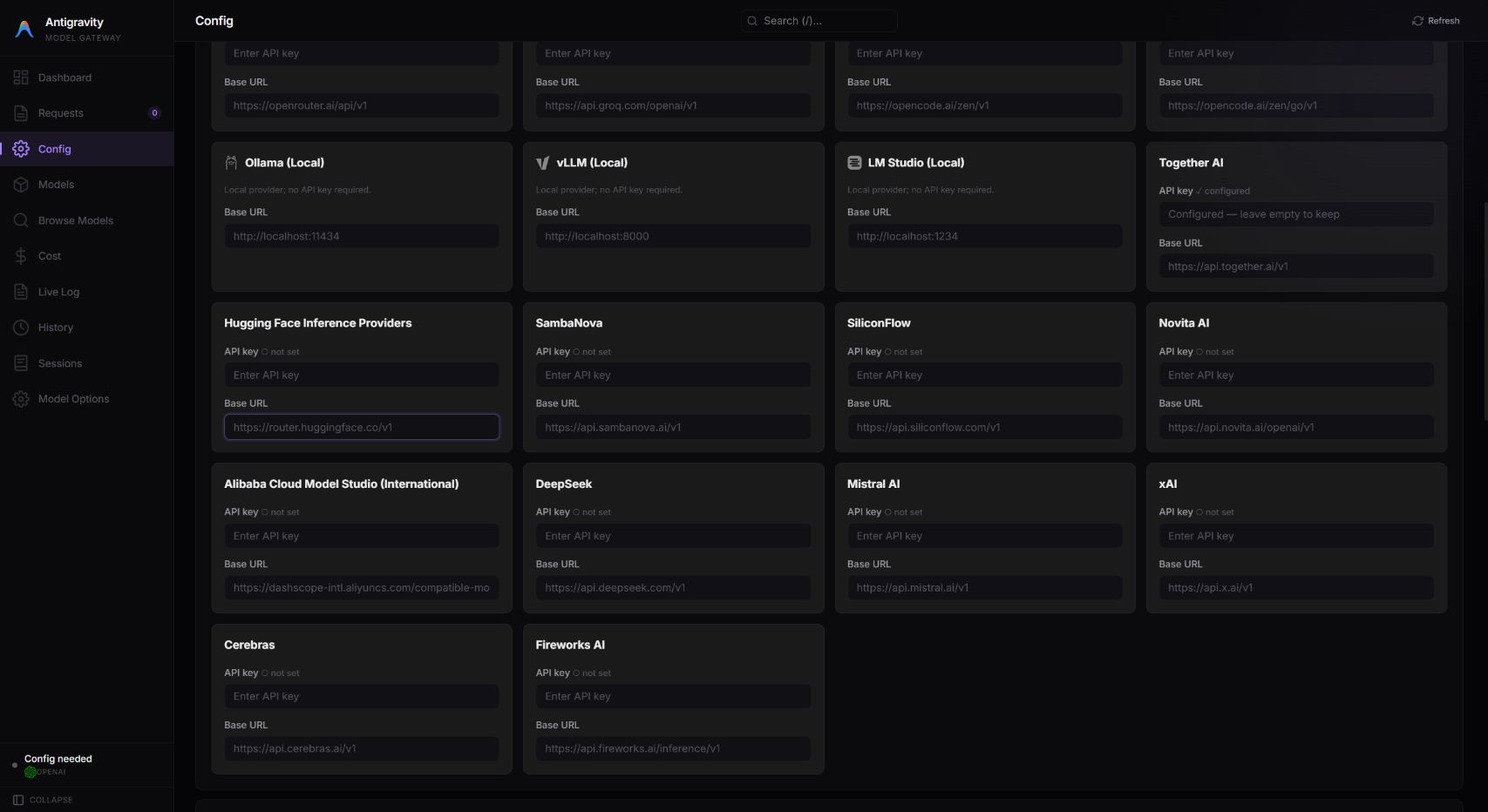
Gateway provider settings in an isolated local test profile; no live credentials are shown.
Cloudflare Workers AI
- Select Cloudflare Workers AI in the desktop model editor.
- Replace
ACCOUNT_IDin the API URL with your Cloudflare account’s 32-character ID. The full chat URL ishttps://api.cloudflare.com/client/v4/accounts/ACCOUNT_ID/ai/v1/chat/completions. - Enter a token created with Cloudflare’s Workers AI API token template; see the REST API setup guide.
- Click Fetch provider models, or enter the exact
@cf/...or@hf/...provider model ID manually. Choose a model with function/tool calling support for Agent or Plan workflows.
Discovery uses Cloudflare’s account-scoped /ai/models/search endpoint with
format=openrouter and a text-generation filter. It follows catalog pages and
also accepts Cloudflare’s native model-list response. Existing Custom entries
using the Cloudflare account URL receive the same discovery behavior.
The standard /ai/v1/models route can return HTTP 405 even when chat works;
that route is not used for Cloudflare discovery. Authentication and other HTTP
errors remain failures, with setup guidance shown in the model editor.
For the optional gateway, enter the token and account-specific base URL under
Providers, or configure the gateway’s .env file:
WORKERS_AI_API_KEY=your_workers_ai_token
WORKERS_AI_BASE_URL=https://api.cloudflare.com/client/v4/accounts/ACCOUNT_ID/ai/v1
Then select workers-ai in a gateway model route and enter its exact provider
model ID. When upgrading, rebuild and restart the gateway. For the desktop,
rebuild and rerun the installer with Antigravity closed, as described in
installation.
The proxy normalizes integer tool-schema bounds such as minLength: "1" to
minLength: 1 before forwarding requests. This applies to OpenAI-compatible,
Anthropic, and gateway tool declarations, including parametersJsonSchema.
Other schema constraints and literal defaults/examples are preserved. Recognized
desktop HTTP 400/422 schema failures include a short diagnostic hint without exposing
the provider’s raw error body, credentials, or echoed prompt content.
Catalog access does not test generation or guarantee that a particular model supports tools. Automated coverage uses local HTTP fixtures, including streaming function calls; an authenticated live Cloudflare session is not part of those tests.
Fallback chains for rate-limited providers
Parallel agents (for example, /team where your Antigravity version supports it)
and simultaneous sessions can exhaust one provider model’s request limit.
For normal custom-model requests through the desktop/IDE proxy, fallbackModels
lets a failed request try other saved models in order. This is reactive failover;
it does not distribute healthy requests across models or combine their quotas.
The optional gateway has its own routing configuration.
Workers AI limits
As checked on 2026-10-13, Cloudflare documents these limits:
| Text-generation model / billing | Requests per minute |
|---|---|
| Model requiring the Workers Paid plan, standard Workers AI billing | 20 per account, per model |
| Same paid-model category, prepaid AI Gateway credits with the gateway’s Workers AI billing set to Unified billing | 50 per account, per model |
| Other text-generation models | 300 default; do not assume a separate 300-RPM bucket for every model |
Adding credits alone does not enable the higher limit. Check each model’s page for its plan requirement; beta models can have lower limits. See the current Workers AI limits before sizing a workload.
Different paid models can have separate provider limits, but all your sessions using the same account and upstream model share its limit. Saving that same model under another local name does not create more quota. Three 20-RPM models therefore do not guarantee 60 successful requests per minute through the proxy: retries, latency, shared usage, circuit breakers and the total time budget affect progress.
Example: two primaries with a shared backup
- Configure three enabled models using the Workers AI setup above. For agent workloads, every model and serving endpoint in the chain must support function/tool calling and the request’s other required capabilities, such as image input and context size.
- Find each model’s saved internal
namein Configuration name (unique) in the model editor. In this example they aremodels/workers-primary,models/workers-secondaryandmodels/workers-light. These are illustrative local names, not provider IDs or display labels; substitute your actual saved names. - Under Advanced settings → Fallback model configuration names (comma separated), enter each primary’s fallback names in the order below. Save the models.
| Model selected for a request | Fallback names in order |
|---|---|
models/workers-primary |
models/workers-secondary, models/workers-light |
models/workers-secondary |
models/workers-primary, models/workers-light |
models/workers-light |
Leave empty |
The equivalent fields on the first model are shown below. This is a partial
configuration example, not a complete import: keep that model’s existing
endpoint, credentials, provider ID and other fields. Only the fallback/retry
fields need changing; name identifies the existing entry.
{
  "name": "models/workers-primary",
  "fallbackModels": ["models/workers-secondary", "models/workers-light"],
  "maxRetries": 1,
  "retryBudgetMs": 120000
}
With these settings, a retryable failure such as HTTP 429 can cause one retry on
the first model before trying the secondary, then the light model if needed.
The example’s maxRetries: 1 reduces time spent retrying a busy primary; set it
through Advanced settings → Maximum retries (0–5) and tune each model for
your workload. retryBudgetMs is a JSON-only setting. The default maxRetries: 3
permits the initial attempt plus three retries. Each fallback uses its own retry
setting, while the original primary’s retryBudgetMs covers the entire chain.
Backoff (including Retry-After) consumes that budget, so it can expire before
all alternatives are reached. An open circuit breaker can skip a model.
Only the original primary’s list is followed. The first row produces primary → secondary → light; it never follows the secondary’s list back to primary. A list containing only secondary would not discover light through secondary’s list. Missing, disabled, duplicate and self references are skipped. HTTP 400/422 request/schema errors do not trigger fallback, and retries/fallback stop once model output begins. See configuration fields for the supported ranges and defaults.
Where your runtime lets you choose a model for each agent, selecting a suitable lighter model before starting the team can proactively reduce pressure on the primary. Fallback only reacts after failure; it does not make a model faster or increase its provider quota. This example documents existing proxy behavior, not a live Workers AI throughput benchmark.
The IDE’s separate MCP delegate_to_model worker
always uses the exact requested model with retries and fallback disabled. Its
four-worker concurrency limit is separate from provider rate limits; the chains
above do not apply to MCP delegation.
Discovery and compatibility notes
| Provider | Discovery behavior and account requirements |
|---|---|
| Together AI | /models returns an array with multiple model types; discovery selects chat models and reads their display names and context limits. Models API |
| Hugging Face | /models lists chat models and their serving providers. Use a token with Make calls to Inference Providers permission. Model IDs can end in :fastest, :cheapest, :preferred, or a specific provider such as :groq. Enter a suffixed ID manually to pin that choice. Context limits and tools can differ between providers serving the same model. Router and metadata |
| SambaNova | /models supplies model IDs and context/output limits. Tool calling requires a compatible model; combining tools with n > 1 is rejected. Compatibility |
| SiliconFlow | /models?sub_type=chat filters out other tasks. The default is the international endpoint; use the endpoint matching your account. Tool calling and thinking combinations depend on the model. Model listing |
| Novita AI | /models uses title and context_size metadata. The current default API prefix is /openai/v1. Model listing |
| DashScope | Discovery uses /api/v1/models on the configured host, filters for text generation, and follows page_no pagination. The default is Singapore/international; region, workspace domain, API key, and model availability must match. Model listing |
| Fireworks AI | Discovery reads the public fireworks account catalog through /v1/accounts/fireworks/models, follows pagination, and filters unavailable or explicitly non-serverless entries. Enter private model IDs or deployment-specific identifiers manually using your deployment’s endpoint. Model listing |
Discovery does not generate an answer or exercise tools. Save a small selection and try the workflow you need. If discovery is unavailable, enter Provider model ID manually. Use Advanced settings for supported limits and request options; a capability override cannot enable a feature the upstream model lacks. The integrations above use Chat Completions; provider features that require a different API, such as Responses-only tools, are not enabled by adding a preset.